Intro to Linux Server Administration
Why you should learn Linux?
I think if you are curious about Operating Systems, and you want to change to a faster OS, or if you just want to upskill your development skills, you should probably learn it.
The person who manages a server, is usually known as SysAdmin
Explaining the job roles that exist within the Linux Ecosystem
- DevOps Engineer: They create processes and automation around servers
- Site Reliability Engineer: They ensure services are always upskill
- Security Operations Enginer: They are in charge of keeping security on a red level security and application level security
- Network Engineer
- Database Administrator
- Network Operation Center (NOC) Engineer: On Premise Engineers
- MLOps Engineer
- Cloud Engineer
Key skills on Linux
- Access Control
- Monitoring
- Resource Administration
- Troubleshooting (the most important one)
- Software Installation and Maintenance
- Backup Creation
- Documentation
What is a Server?
A server is a group of technological resources, that serve information to a client.
Mainframe and Dumb Terminals
This was the first iteration to have servers.
This is how a dumb terminal looks:

Client-Server Architecture
Now we have clients and servers. Clients consume or use information provided by the Server.
The example of GEFORCE NOW
The servers are specialized. Meaning, we have servers that only do one thing.
Types of Servers:
- Web Servers
- DB Servers
- Testing Servers
- Videogame Servers
- Email Servers
- File Servers
- VoIP Servers
- SFTP and Samba Servers
What is a Samba Server?
??
What is Linux?
Linux is Kernel.
And what is a kernel?
Is the core/primary software that manages an operating system. It acts as a bridge between Hardware and Software.
P.S: It would be great if you read Operating Systems Concepts, and master data structures and algorithms if you are interested to learn more about Kernel Development
P.S: You can also read this: Kernel Hackers
Then, what it is GNU/Linux?
Is a set of operating systems that use Linux as a kernel, and another set of programs to make an entire operating system.
Each Linux OS is known as a Distro, or distribution
Common Distributions
- Red Hat: Private Owned Linux Distribution, with support from specialized agents.
- Ubuntu: Open Source Linux Distribution.
- Debian: Open Source Linux Distribution.
- Fedora: Open Source Linux Distribution.
Linux vs Unix
Unix is an operating system, created by Bell Labs from AT&T. This operating system is closed-source, and the primary related operating systems that are based on UNIX, are FreeBSD and macOS.
Layers of a Linux System
- Hardware: Every physical device belongs to this layer.
- Kernel: Controls all of the hardware of a server, such as the CPU usage, or RAM usage.
- Shell: Interface between Kernel and User, this piece of software allows us to execute commands and send them to a low level system.
- Applications: Is the last layer, is the piece of software that the user initeracts with, that gets translated into commands to the system.
Open Source and Free Software
GNU
Richard Stallman is the man. He got mad at a printer on Xerox and wanted to modify the software, but he couldn't because the code already came compiled, and no source code was available.
GNU stands for: GNU's Not Unix (It is a recursive name)
The GNU is this animal:

Free Software Foundation:
The Free Software Foundation was created by Richard Stallman, with four maxims (indexed at 0 as the good programmer he is):
- Freedom to execute the program
- Freedom to study the software and modify it
- Freedom to redistribute the software to others
- Freedom to redistribute copy of modified versions to others
All GNU software is open source, but not all open source is GNU.
P.S: Linux started as a hobby, so never think that your hobbies are ridiculous!
Open Source Initiative
Businesses wanted to put restrictions, such as wanting people to read and help maintain the code, but not sell it or re-distribute it.
You can sell a modified version of a GNU software, you cannot necessarily sell a modified version of an open source software.
Here are some examples of open source software:
- Blender
- React
- OBS
How does GNU and Open Source is related to Linux Distributions
- Ubuntu
- Red Hat Enterprise Linux (paid, with support, also known as RHEL)
- Debian
- FreeBSD
LTS
Long Term Support, is a guarantee of 5 years of support and maintenance.
Rolling vs Fixed Release
Rolling: Released when published (Arch Linux, Gentoo) Fixed: Tested first and then published (Ubuntu)
Where do servers live?
- On Premise: Physical and auto-administrated
- Cloud: Company manages the physical part and offers you the ability to customize it through a computer
- Public: AWS, Google Cloud, Azure. Anyone can work on these.
- Private: Privately owned cloud.
- Hybrid: A combination between on premise, and cloud
Datacenters are places where specialized and smart people manage those servers, on premise.
There are even servers that are on water due to heating issues.
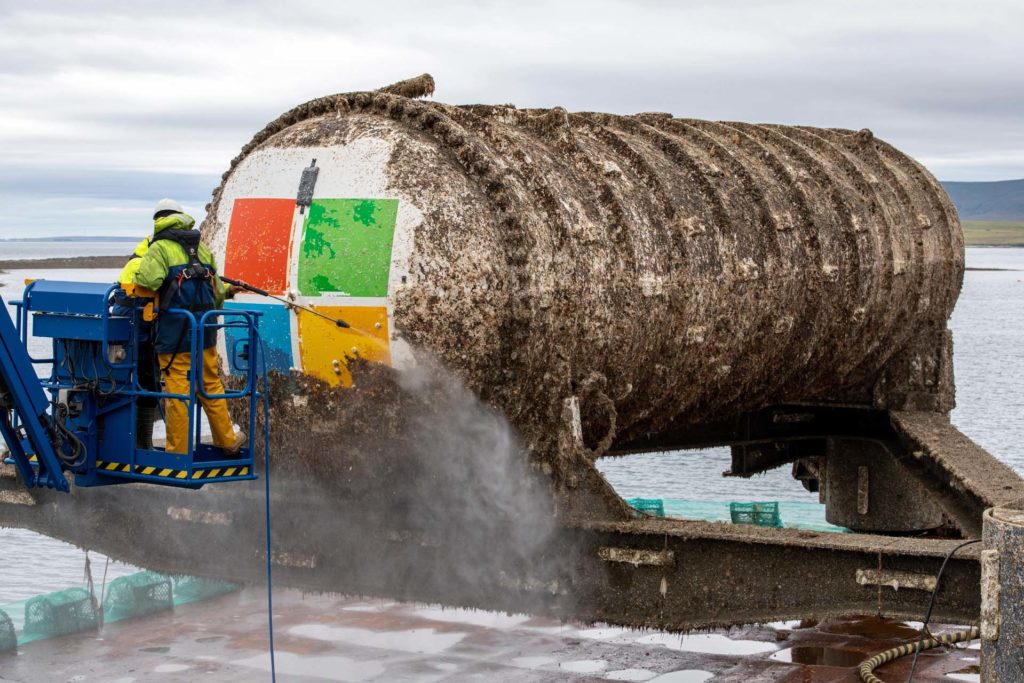
How to install Linux
Types of Installation
- Direct: By using Disk Space on our primary device
- Virtualization (through Hypervisor)
- Type 1: Bare Metal
- Type 2: Hosted
- Dual Boot: We can install multiple OS in our computer and select them when we turn the computer on.
- USB: We can install a OS in a USB, but it will be slower than doing the thing in the primary device.
Differences between Docker Containers and Virtual Machines
Containers virtualize the operating system, sharing the host's kernel, making them lightweight, fast, and portable, ideal for microservices, but with less isolation than VMs. Think of VMs as separate virtual computers, while containers are isolated app environments within a single OS.
What is a Workstation?
A workstation is a high-performance computer for demanding professional tasks (like 3D design, video editing, engineering) or a dedicated physical workspace with equipment for specialized tasks, featuring powerful components (CPU, RAM, GPU) for intensive data processing.
Installation via Virtualization
For this installation method, I recommend that you download Virtualbox, from Oracle. This is a good point to start tinkering without having to commit your entire computer to an installation.
About the Ubuntu Versions, we have multiple things:
- Ubuntu Desktop
- Ubuntu Server
We need to download the Ubuntu Server ISO file
What is an ISO file?
An ISO file, or also known as "Optical Disc Image" is a disk image, contains the information that would be written to an optical disk, including the disk file system. It is very popular on console emulation. This ISO file in this case, would contain everything that Ubuntu Server has. An ISO is the standard way to distribute complete operating systems.
What is a disk image?
Is a snapshot of a storage device's content. It's a bit by bit copy of the disk image.
What is a Hypervisor?
Hypervisor is a software that can use the resources of a computer and split it into multiple virtual operating systems.